Sewzy
Sewzy
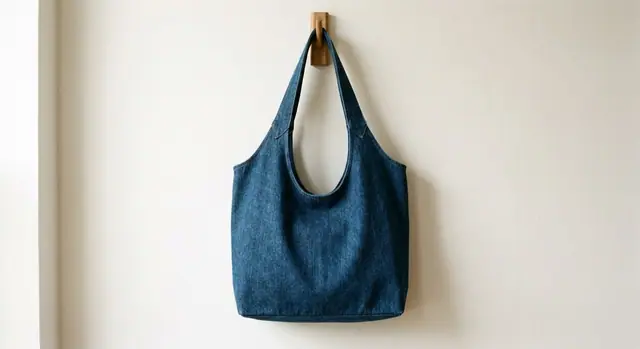
You saw a bag in a shop window, a dress on Pinterest or a toy at a craft fair, and now you want to sew it. There is rarely a pattern with the same name, so the trick is to read the photo for the details that matter, then search for those. Here is how.
Read the photo first
Before you search, look at the photo as a sewist and note five things:
- The item: a tote or a hobo bag, a skirt or a dress, a plush or a cushion. Be specific.
- The shape: boxy, A-line, gathered, slouchy, round. For bags, does it have a flat base?
- The seams: where do they run? A center front seam, a yoke, side panels, a gusset?
- The closures: a zipper, buttons, a drawstring, elastic, ties, snaps.
- The fabric: does it drape (rayon, lawn) or stand up (canvas, quilted cotton)? Is it quilted, padded or stretchy?
Turn the details into search words
Put the words in the order a pattern maker would: shape, item, then features. "Slouchy hobo bag sewing pattern with lining" will find more than "bag like the one in the photo". Add "sewing" to every search, because otherwise knitting and crochet patterns fill the results.
Reverse image search and Pinterest Lens
Most search engines let you search with an image. Upload the photo, or a crop of just the item, and look through visually similar results for pattern listings. Pinterest Lens does the same from inside the Pinterest app. Results vary a lot, so treat them as leads, not answers.
What Sewzy's photo search does
In Sewzy, you can add a photo or a screenshot and the app shows the closest of its 76 patterns. For example, a photo of a denim shoulder bag comes back with the Slouchy Hobo Bag. To be clear about what it does not do: it does not draft a new, custom pattern from your photo. It finds the nearest pattern Sewzy already has, which you can then sew as it is or adapt.
When to adapt a close pattern
Often the nearest pattern needs only a small change. Changes that are easy to make yourself:
- Length: lengthen or shorten a skirt, dress or strap at the marked line or the hem.
- Pockets: add a patch pocket or leave one out.
- Fabric: the same tote looks completely different in canvas, quilted cotton or corduroy.
- Trims: piping, a contrast band or a different closure change the look without changing the pattern.
Changes to the shape itself, like turning a boxy top into a fitted one, are harder. For those, a pattern that already has the right shape is the better start.
Make it with Sewzy
Sewzy's photo search is on the home screen of the app. When it finds a match, you get the pattern in every size with a printable PDF and a written step-by-step guide, and the AI sewing coach can help you plan small changes. Download Sewzy on the App Store, or browse all 76 patterns first.
FAQ
Can AI make a sewing pattern from a picture?
Some tools try, but a photo hides a lot: the back, the seams, the fabric's weight and how it is constructed inside. A pattern you can actually sew still needs measurements and drafting. Matching the photo to an existing pattern and adapting it is the most reliable route for most people.
Does Sewzy make a custom pattern from my photo?
No. It compares your photo with its 76 patterns and shows the closest ones. It does not draft a new pattern. To compare apps first, read the best sewing apps in 2026.
What photo works best?
A clear, front-on photo of the whole item on a plain background. Screenshots from Pinterest or a shop page are fine.
 What size sewing pattern do I need?6 min read
 Thanksgiving porch goose outfits: turkey, harvest and scarecrow looks to sew5 min read
 Handmade Christmas gifts to sew: 15 ideas by time and skill6 min read
 Fabric advent calendar tutorial and Christmas ornaments to sew5 min read